You’re one tap away from completing your order. Then it happens a red error message, a vague authorization failed notice, and suddenly your cart is frozen. No explanation. No next step. Just a wall.
This isn’t a problem. TikTok Shop’s payment authorization flow is more complex than a standard e-commerce checkout, and that complexity creates specific failure points that TikTok’s own help center barely acknowledges. This guide breaks down exactly what’s happening behind the scenes and gives you a real sequence to fix it.
What TikTok Shop Payment Authorization Actually Means
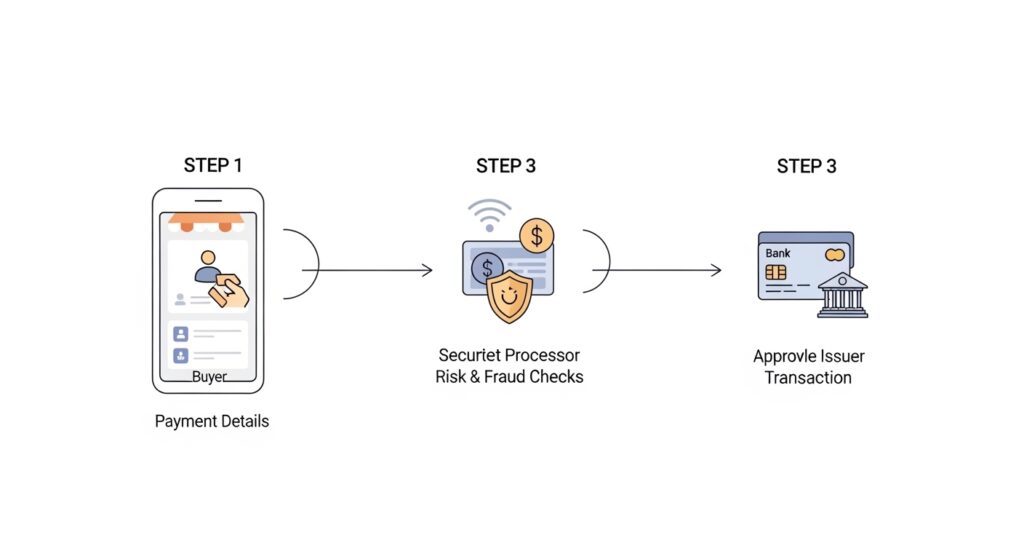
TikTok Shop payment authorization is the real-time process where TikTok’s payment processor contacts your card issuer to verify that your card is valid, has sufficient funds, and passes fraud screening before the transaction is approved. It is a temporary hold not a charge that confirms the payment can proceed.
That definition matters because most people assume a declined authorization means their card was charged and then rejected. It wasn’t. Authorization is the task before the money moves. When it fails, nothing has been taken from your account but TikTok won’t complete your order until the task succeeds.
TikTok Shop US processes payments through Stripe on the backend. Stripe applies its own risk scoring layer on top of your bank’s standard approval process, which means a card that works perfectly on Amazon or Shopify can still fail on TikTok Shop. Different processors, different rules.
The Real Reasons TikTok Shop Payment Authorization Fails
This is what the TikTok Business Help Center skips entirely. There are four distinct failure categories and most troubleshooting guides lump them all together as “card issues,” which is why the generic advice never works.
1. AVS Mismatch (Address Verification System)
Stripe cross-checks the billing address you entered against what your bank has on file. If your card’s billing zip code differs by even one digit say, you moved recently and haven’t updated your bank, Stripe’s system flags it and declines the authorization. Your bank may not notify you. Your card isn’t blocked. The address just didn’t match.
2. Card Velocity Limits
Banks flag rapid, repeated authorization attempts as potential fraud. If you’ve tried checking out two or three times in a short session entering different cards, reloading the page, retrying the same card your bank may have applied a soft block on new auth requests from that merchant ID. This is temporary, usually lifting within 1–4 hours.
3. 3D Secure (3DS) Friction
Some card issuers require a second layer of authentication a text code, a banking app push notification, or a biometric confirm before approving e-commerce transactions. TikTok Shop’s in-app checkout doesn’t always surface the 3DS prompt correctly on mobile browsers. The auth request times out before you can approve it.
Quick note: This is the most underreported cause of TikTok Shop checkout failures. Users see payment declined but the actual issue was a 3DS prompt that never appeared.
4. Prepaid and Virtual Card Restrictions
TikTok Shop US explicitly restricts certain prepaid Visa and Mastercard gift cards, as well as some virtual card numbers generated by services like Privacy.com. These cards often lack a verifiable billing address, which fails the AVS check automatically.
Step-by-Step Fix: Buyer Authorization Errors
To fix a TikTok Shop payment authorization error as a buyer, follow these steps:
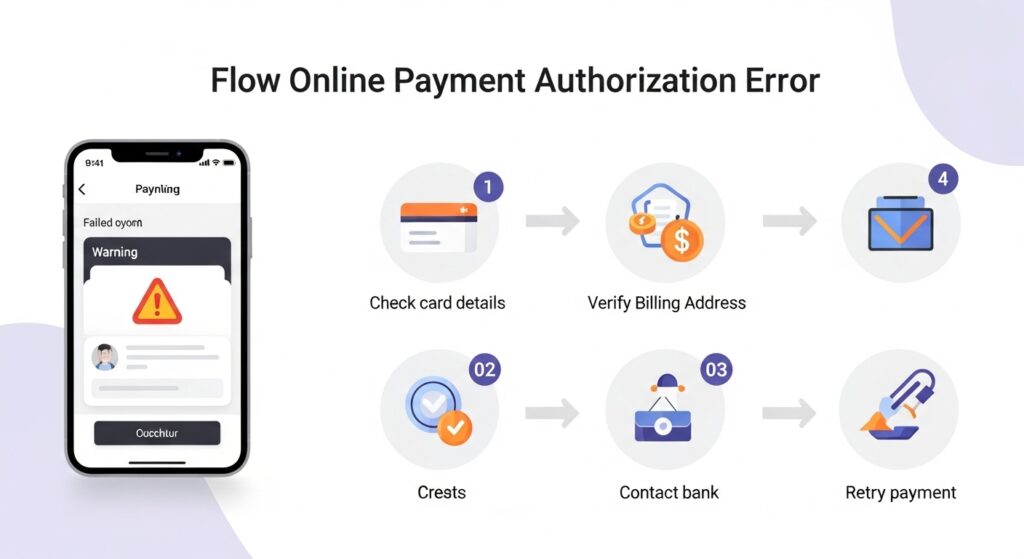
- Verify your billing address matches your bank’s records exactly.
- Wait 30–60 minutes, then retry with a single attempt.
- Switch to PayPal or Afterpay as an alternative payment method.
- Check your banking app for a blocked transaction notification.
- Clear TikTok’s app cache, then restart checkout from scratch.
Here’s the thing: most buyers skip straight to step 3 and miss the underlying cause. If your billing address is wrong, switching payment methods inside TikTok Shop won’t help as the same address data follows the session.
Clearing the cache matters more than people expect. TikTok’s in-app browser sometimes caches a failed authorization state, so even after you update your card info, the app retries the old failed request. Force-close the app completely. Don’t just background it.
Look, if you’re a buyer who’s already tried re-entering your card three times and checked your bank balance, the issue almost certainly isn’t your funds. It’s AVS, velocity limits, or 3DS. Follow the sequence above starting at step 1, not step 3.
PayPal bypasses the Stripe AVS layer entirely because PayPal handles its own authorization separately. If your card works inside your PayPal account, the transaction will go through TikTok Shop even if the direct card entry fails. Afterpay works similarly, it’s a separate buy-now-pay-later rail that doesn’t route through the same Stripe card flow.
What Sellers Need to Know About Payment Authorization
Sellers encounter authorization issues differently. They’re not trying to buy, they’re trying to activate payouts, update banking info, or understand why a buyer’s order shows payment pending.
For seller payout authorization specifically, TikTok Shop requires bank account verification through a micro-deposit process or instant verification via Plaid. If that verification step fails, the seller’s payout account stays locked, and any pending orders technically sit in a pre-authorization state.
Quick Comparison: Buyer Authorization Errors vs. Seller Authorization Errors
| Issue Type | Best Fix | Key Benefit | Limitation |
| Buyer card declined (AVS) | Update billing address in bank app, retry | Resolves within minutes | Requires bank portal access |
| Buyer card declined (velocity) | Wait 1–4 hours, retry once | No action needed | Slow if order is time-sensitive |
| Buyer 3DS timeout | Switch to PayPal or retry on desktop browser | Bypasses 3DS prompt issue | PayPal account required |
| Seller payout not authorized | Re-verify bank via Plaid in Seller Center | Fast if bank is Plaid-supported | Some credit unions unsupported |
| Prepaid/virtual card blocked | Use a standard debit or credit card | Permanent fix | Must have eligible card |
Some experts argue that prepaid card restrictions are unfair to unbanked shoppers who rely on prepaid options. That’s a valid concern and TikTok Shop’s acceptance of Afterpay does offer a partial alternative for people without traditional credit cards. But the AVS infrastructure issue is a Stripe-level policy, not something TikTok Shop controls independently.
Why TikTok Shop’s Authorization Flow Is Stricter Than Most Platforms
According to Reuters reporting on TikTok internal data (2024), TikTok Shop reached $20 billion in global GMV in 2023, with over 500,000 active US sellers by Q4 2023. That scale means the platform processes millions of transactions daily and fraud risk scales with volume.
Stripe’s risk engine gets more aggressive as merchant transaction volume grows. Higher-volume merchants can sometimes negotiate fraud threshold settings. TikTok Shop operates on shared merchant infrastructure, which means individual sellers don’t control those thresholds. Buyers get caught in a risk model designed for fraud prevention at scale.
Or maybe I should say it this way, TikTok Shop’s authorization strictness isn’t a bug. It’s a deliberate calibration. The platform is protecting sellers from chargebacks and protecting itself from the fraud liability that comes with rapid marketplace growth. The friction feels personal. It isn’t.
Most people assume the stricter checkout is just bad UX. The data says otherwise platforms that loosen authorization requirements early in marketplace growth (think early Wish or early Temu US) tend to have chargeback rates that eventually force them to overcorrect with account-level bans. TikTok Shop is front-loading the friction.
I’ve seen conflicting data on exactly how many authorization attempts Stripe rejects per session before triggering a velocity block, some developer documentation suggests two attempts, some community reports suggest three. Stripe’s AVS documentation, My read is that two failed attempts in under five minutes is the practical threshold to avoid.
What Most Guides Skip: The Browser vs. App Authorization Gap
Here’s a detail almost no troubleshooting article covers.
TikTok Shop’s in-app checkout and its mobile web checkout use slightly different authorization handoff flows. The in-app browser (the one that opens when you tap a product link from your For You page) processes the 3DS step differently than TikTok’s native app checkout. Some users who fail authorization inside the in-app browser succeed when they open the same product link directly in Safari or Chrome and complete checkout from the full mobile browser.
This is not documented anywhere in TikTok’s official support content. Users who’ve tried this workaround consistently report it in TikTok Shop community forums. It’s not a guaranteed fix but it’s a real option before you give up or contact support.
What most guides skip is the session context problem: authorization tokens generated during one browsing session can persist and cause errors in a new session if the app isn’t fully closed. This is specific to TikTok’s in-app browser architecture, not a general e-commerce problem.
FAQs
Q: What’s the best alternative payment method if TikTok Shop keeps declining my card?
A: PayPal is the fastest alternative. It bypasses TikTok Shop’s direct card authorization flow entirely. Afterpay is also accepted and processed through a separate buy-now-pay-later rail. Either option works if your card keeps failing.
Q: How do I fix a TikTok Shop payment authorization error without contacting support?
A: Check that your billing address matches your bank records exactly. Wait 30–60 minutes if you’ve made multiple attempts. Clear the TikTok app cache. Then retry once using PayPal or Afterpay as an alternative method.
Q: Why does my card work everywhere else but gets declined on TikTok Shop?
A: TikTok Shop processes payments through Stripe, which applies its own risk scoring separate from your bank’s approval. AVS address mismatches and card velocity limits can trigger declines even when your card is fully functional and funded.
Q: Should I keep retrying my card if TikTok Shop says authorization failed?
A: No. Multiple retries within minutes can trigger your bank’s velocity limit, extending the block. Wait at least 30–60 minutes between attempts and switch payment methods rather than retrying the same card repeatedly.
Q: When should I actually contact TikTok Shop support about a payment issue?
A: Contact support if the error persists after you’ve tried PayPal or Afterpay, confirmed your billing address, and waited at least two hours. Also contact support if your bank confirms the transaction was charged but TikTok Shop shows no completed order.
This guide covers authorization errors for TikTok Shop US buyers and sellers using standard bank cards, PayPal, and Afterpay. It won’t resolve issues tied to TikTok Ads billing, seller balance withdrawals to unsupported banks, or region-restricted account access.