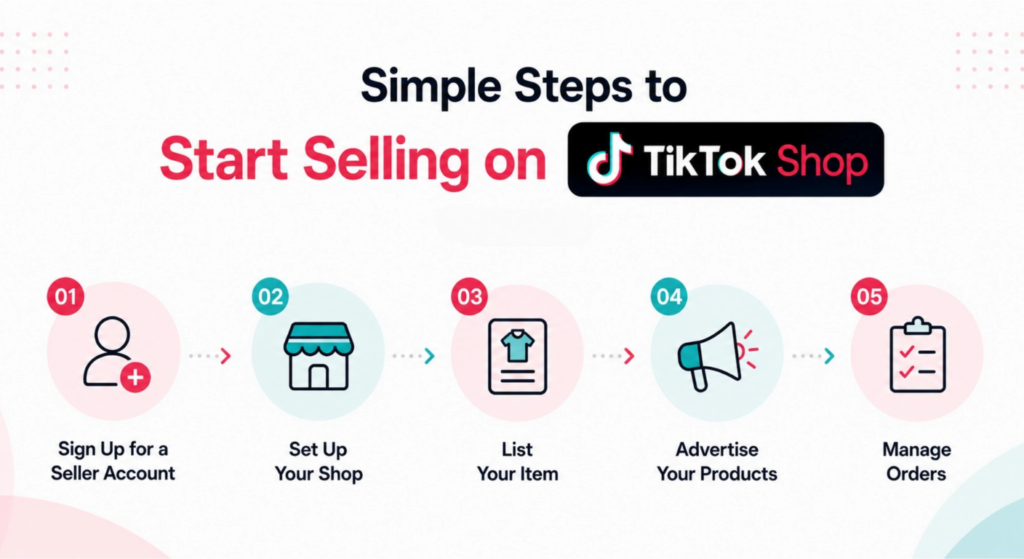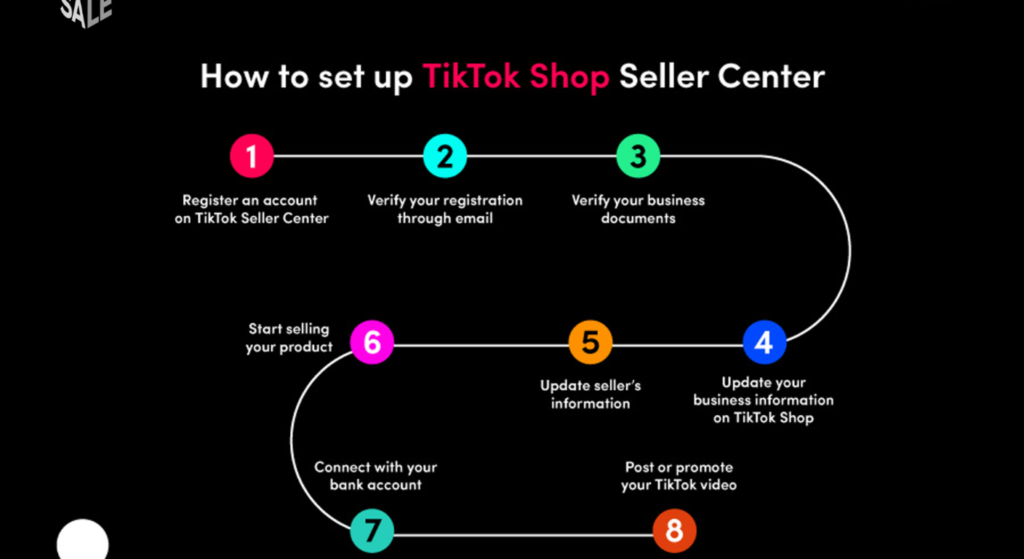
New Seller Guide Introduction refers to the foundational orientation every first-time TikTok Shop seller needs before touching the dashboard covering what the platform is, how its selling mechanics work, and what setup steps must happen in the right order to avoid account flags or registration rejection.
Let’s be honest. The dashboard is a lot.
You land on seller-us.tiktok.com expecting something that feels like setting up an Etsy store, and instead you’re staring at tabs for Affiliate Creators, Logistics Settings, and Qualification Thresholds none of which were in the YouTube video you watched at 1 a.m. last week. That disorientation is normal. It’s also fixable, but only if you understand what TikTok Shop actually is before you start clicking.
TikTok Shop is not a marketplace in the traditional sense. It’s a social commerce layer built directly into TikTok’s content ecosystem. Products are discovered through short videos, LIVE streams, and creator affiliate content not through search bars the way they are on Amazon or eBay. That distinction changes everything about how you set up, list, and sell.
According to eMarketer’s 2024 Social Commerce Forecast (citing TikTok’s own 2023 Commerce Report), TikTok Shop drove over $20 billion in global GMV in 2023, with the US market posting the fastest new-seller growth of any region. That number matters not as a hype stat, but because it signals that the infrastructure is real, the buyer base is active, and getting in early still carries an advantage.
Or maybe I should say it this way: the platform works. But only for sellers who understand its logic from day one.
Who Can Sell on TikTok Shop and What You Actually Need to Register
This is where most beginner guides skip straight to click here, upload that without explaining the eligibility layer underneath. Don’t make that mistake.
To register as a US seller on TikTok Shop, you need one of the following business structures:
- A registered US LLC or Corporation (most common)
- A sole proprietorship with an EIN (Employer Identification Number)
- An individual seller account (available in select cases with SSN + government ID)
Here’s what TikTok will ask you to upload during registration:
- Government-issued photo ID (passport or driver’s license)
- Proof of business Articles of Incorporation, LLC formation documents, or equivalent
- EIN or SSN depending on your business type
- Bank account details for payout setup
- Business address (must match your registration documents)
Quick note: Mismatches between your ID name and your business registration name are the single most common reason for registration rejection. Not policy violations. Not suspicious activity. Just name mismatches. Check that before you submit.
To complete TikTok Shop seller registration, follow these steps:
- Go to seller-us.tiktok.com and click Sign Up
- Choose your account type: Individual or Business
- Upload required documents matching your business registration name exactly
- Enter your EIN or SSN for tax identity verification
- Connect a US-based bank account for payouts
- Submit and wait 1–3 business days for approval
Some experts argue that individual accounts are easier to start with because they require fewer documents. That’s valid if you’re testing the platform with no inventory commitment. But if you’re planning to run product ads, use the Affiliate Program at scale, or integrate with Shopify a business account is the only path that doesn’t hit structural limits within 30 days.
What Happens If Your Registration Gets Rejected The Step Most Guides Ignore
It happens more than people admit. TikTok’s automated verification system flags applications for reasons that feel arbitrary but are almost always traceable.
The three most common rejection triggers:
Document quality issues photos taken at an angle, blurry edges, or cropped corners. TikTok’s system needs to read the full document. Use a scanner app or photograph flat on a white surface in bright light.
Name inconsistency: your legal name on your ID doesn’t match the name on your business formation documents. This is not a judgment call on TikTok’s end. It’s a compliance check. Fix it at the source.
Business address mismatch if your LLC was formed in Delaware (common for online businesses) but your physical address is in Texas, upload a document that clarifies the operating address separately.
If you’re rejected, here’s what to do:
Check the rejection email for a specific reason code. Log back into the Seller Center. Go to Account → Verification → Resubmit. You can resubmit up to three times before the account enters a manual review queue, which adds 5–7 business days.
Don’t create a second account. That triggers a permanent flag.
Your First 7 Days After Approval: A Realistic Action Plan
Approval email arrives. Now what?
Most new sellers celebrate for about 10 minutes, then spend the next 3 days frozen in the dashboard. Here’s the sequence that actually moves you forward.
Days 1–2: Seller Center orientation + shop profile setup
Complete your shop name, banner image, and shop description before listing a single product. TikTok’s algorithm uses profile completeness as part of its early ranking signals for new shops. An incomplete profile also drops conversion rate on your first product page buyers check the shop tab.
Days 3–4: List your first 3–5 products
Don’t list 50 products. Don’t list 1. Three to five gives TikTok’s system enough catalog data to start categorizing your shop, without spreading your early traffic signals too thin.
For each product listing, you need:
- Minimum 3 product images (white background performs best for discovery)
- A product title using natural language not keyword-stuffed strings
- A description that answers: what is it, who is it for, why buy it here
- Accurate shipping weight and dimensions (incorrect data causes fulfillment flags)
Days 5–6: Connect your content or creator strategy
This is where TikTok Shop splits from every other e-commerce platform. You either create content yourself (posting product videos linked to your shop), or you activate the TikTok Shop Affiliate Program which lets registered creators promote your products for a commission you set.
For beginners without an existing TikTok following, the Affiliate Program is genuinely the faster path to first sales. You don’t need followers. You need products that creators want to promote.
Day 7: Review your Seller Center analytics baseline
Before you run any ads or push any content, screenshot your Day 7 dashboard. Shop visits, product impressions, click-through rate. This is your baseline. Every decision in week two gets measured against it.
TikTok Shop vs. Selling on Amazon or Shopify: Which Is Right for You?
Some new sellers come to TikTok Shop after trying Amazon FBA or Shopify. Others are starting e-commerce for the first time here. The context matters.
Quick Comparison
| Platform | Best For | Key Benefit | Limitation |
| TikTok Shop | Impulse-driven, visual products | Built-in audience + content discovery | Requires content or creator partnerships |
| Amazon | Search-intent buyers, repurchase products | Massive existing buyer base | High ad costs, intense price competition |
| Shopify | Brand-building, owned customer relationships | Full customization + data ownership | No built-in traffic — you bring your own |
| TikTok Shop + Shopify | Scaling sellers wanting dual-channel reach | Catalog syncs, unified inventory | Setup complexity increases |
Here’s the thing: TikTok Shop and Shopify aren’t competitors for most sellers. Shopify offers a direct TikTok integration that syncs your product catalog automatically so inventory, variants, and pricing stay consistent across both channels. If you already have a Shopify store, connecting it to TikTok Shop takes about 20 minutes and eliminates the need to manually relist every product.
I’ve seen conflicting data on this; some sources report that Shopify-connected TikTok sellers see faster approval times, while others report no difference. My read is that the real advantage isn’t approval speed; it’s operational efficiency once you’re live.
What Most New Seller Guides Get Wrong (And What Actually Matters)
Most people assume TikTok Shop success comes from having a large TikTok following. The data says otherwise.
The shops generating consistent early revenue on TikTok Shop are almost always running creator affiliate campaigns not posting from their own accounts. According to TikTok’s internal seller success data (shared in their 2024 Seller University modules), shops that activate at least 5 affiliate creators within their first 30 days see 3x higher GMV than shops relying solely on their own content in the same window.
What most guides skip is the product-market fit check before listing. TikTok Shop’s discovery algorithm favors products that already perform well in short-video formats meaning products that are visual, demonstrable, and produce an emotional reaction within 3 seconds of being shown on screen. A spreadsheet tool? Hard sell on TikTok Shop. A satisfying organizational product, a beauty item with a visible transformation, a kitchen gadget with a wow use case? Those categories dominate for a reason.
Look, if you’re sitting on 500 units of a product that requires a paragraph to explain, here’s what actually works: lead with the outcome in your content, not the product. Show the result first, then the product second. This applies whether you’re posting yourself or briefing affiliate creators.
This guide covers the setup and first-week foundation for US-based TikTok Shop sellers. It does not address TikTok Shop advertising (Spark Ads, Shopping Ads), advanced logistics setup, or multi-warehouse fulfillment those are separate tracks that only become relevant after your first 20–30 orders.
FAQs
Q: What’s the best way to start selling on TikTok Shop with no followers?
A: Activate the TikTok Shop Affiliate Program immediately after approval. This lets existing creators promote your products for a commission you don’t need any followers of your own to generate first sales.
Q: How do I register as a seller on TikTok Shop?
A: Go to seller-us.tiktok.com, choose an Individual or Business account, upload your government ID and business documents, connect a US bank account, and submit. Approval takes 1–3 business days.
Q: Should I use a business account or individual account for TikTok Shop?
A: Use a business account if you plan to run ads, use the full Affiliate Program, or integrate with Shopify. Individual accounts hit functionality limits quickly and can’t be easily upgraded without re-registering.
Q: Why does TikTok Shop keep rejecting my registration?
A: The most common cause is a name mismatch between your photo ID and your business registration documents. Check that both show exactly the same legal name before resubmitting.
Q: When should I start posting content on TikTok Shop?
A: Complete your shop profile and list at least 3 products first. Content before a complete shop profile wastes traffic buyers who click your link need something to land on and buy.