If you just opened the TikTok Shop Seller Center, looked at the dashboard, and immediately wanted to close the tab that reaction is normal. Not a sign you’re not cut out for this. Just a sign that nobody handed you a map.
This page is the map.
What TikTok Shop Actually Is (And Why It’s Different)
TikTok Shop is TikTok’s native e-commerce layer, a system built directly inside the TikTok app that lets sellers list products, run shoppable LIVE streams, attach product links to short videos, and process payments without ever sending a buyer to an external website.
That’s the key difference. You’re not driving traffic away from TikTok. The entire transaction browse, click, buy, confirm happens inside the app. That changes how selling works here compared to Shopify, Amazon, or Etsy.
According to Bloomberg (2024), TikTok Shop surpassed $1 billion in US sales within its first year of full operation in the US market, with over 500,000 active sellers onboarded by the end of 2023. That number has kept climbing.
Here’s what that means practically: the platform is real, the buyers are there, and sellers who figured out the setup early are already moving products. The window isn’t closed but the advantage of starting now versus six months from now is real.
TikTok Shop is TikTok’s integrated e-commerce platform that allows sellers to list, promote, and sell products directly inside the TikTok app through short-form videos, LIVE streams, and a dedicated storefront tab. No external checkout required. Available to eligible US-based sellers through the TikTok Shop Seller Center.
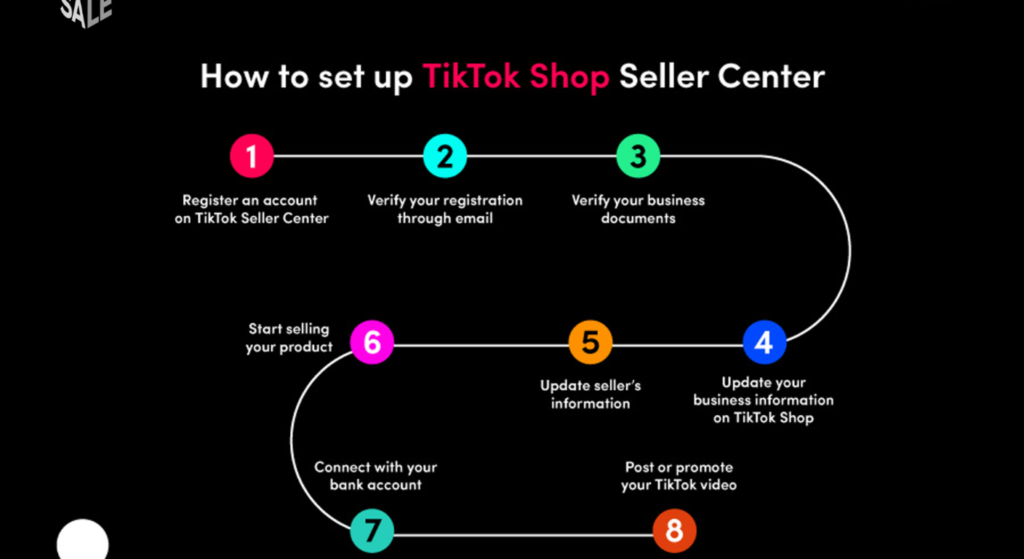
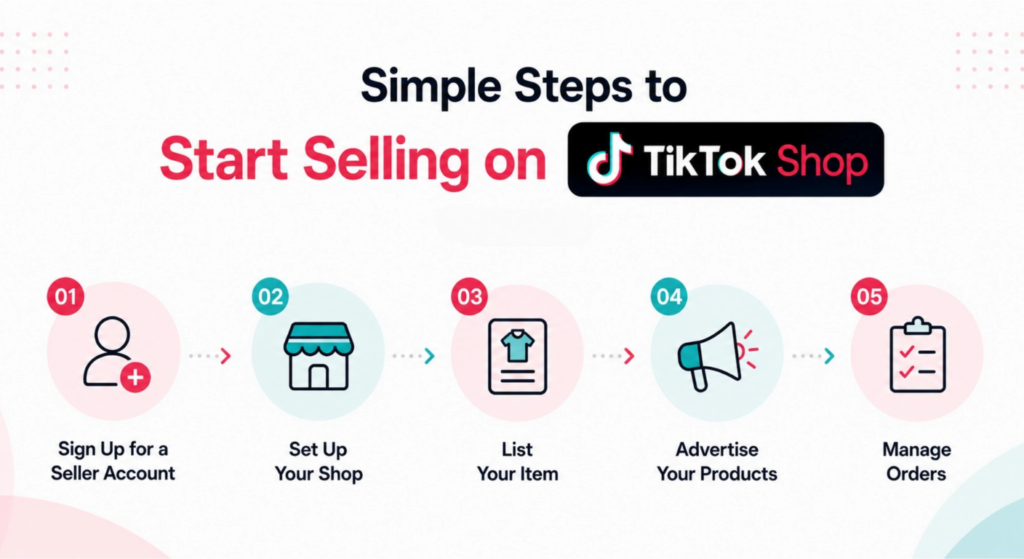
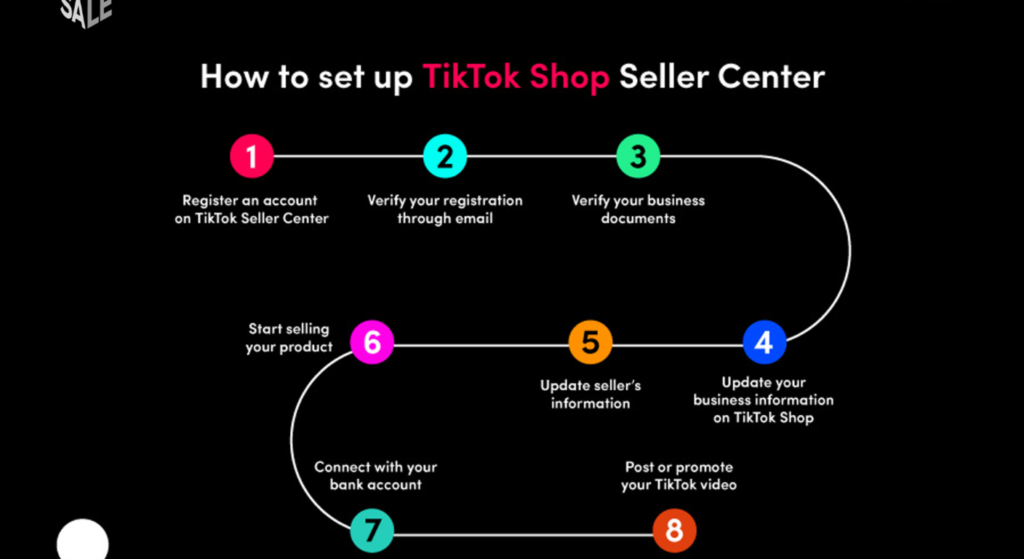
The 7-Step Setup Path (Do These in Order)
Most beginner confusion comes from doing steps out of sequence or skipping one and not realizing it until something breaks later. Here’s the actual order that works.
To set up a TikTok Shop seller account and list your first product, follow these steps:
- Go to seller-us.tiktok.com and click Sign Up
- Choose your seller type: Individual or Business
- Submit identity verification documents (SSN or EIN + photo ID)
- Connect your TikTok account (minimum 1,000 followers required for some features)
- Complete your W-9 tax form inside Seller Center
- Set up your shipping template and return policy
- Create your first product listing with compliant images and description
Each step must be completed before the next one unlocks.
Step 1 Create Your Seller Center Account
Go directly to seller-us.tiktok.com. Don’t start from the TikTok app the seller registration lives on the web portal, not in the consumer app.
You’ll choose between two account types: Individual Seller (uses your SSN for verification) or Business Seller (requires EIN and business registration documents). If you’re just starting out with no LLC yet, Individual works you can upgrade later.
Quick note: TikTok does a soft identity check at this stage. Have a government-issued photo ID ready. The verification usually clears within 24–48 hours, though some users report it taking up to 5 business days during high-volume periods.
Step 2 Connect Your TikTok Account
Your Seller Center account and your TikTok consumer account are separate systems. You have to link them manually.
This is where a lot of beginners hit a wall they didn’t see coming.
Some TikTok Shop features specifically the ability to tag products in your own videos and access certain promotional tools require your connected TikTok account to have at least 1,000 followers. If you’re at 200 followers right now, you can still complete setup and list products, but you’ll be limited to the shop tab and affiliate creator partnerships until you hit that threshold.
I’ve seen conflicting information on this some sources say the follower minimum only applies to video shopping features, others say it gates the storefront tab itself. My read, based on TikTok’s current seller documentation (updated April 2025): the storefront is accessible below 1,000, but video product tagging requires it. Plan accordingly.
Step 3 Submit Your W-9 (Don’t Skip This)
TikTok Shop is required by US law to collect tax information from sellers. Inside the Seller Center, under Settings → Tax Settings, you’ll find the W-9 form.
Fill it out before you list anything. Sellers who skip this and start making sales report that payouts get held until the form is submitted and verified. It’s not optional, it’s just buried in the dashboard in a way that makes it easy to miss.
If you’re using TikTok’s built-in Sales Tax settings, you can configure automatic tax collection by state from the same Settings panel. For more complex compliance needs, especially if you’re selling across many states, tools like Quaderno integrate with your order data and handle multi-state sales tax calculations automatically.
Step 4 Set Up Your Product Sourcing
Before you can list, you need something to sell.
Three realistic paths for beginners:
- Your own inventory physical goods you make or already own
- Wholesale sourcing buy in bulk, store, ship yourself
- Dropshipping list products without holding inventory; supplier ships directly to buyer
For dropshipping on TikTok Shop, AutoDS and Zendrop are the two most-used integration tools among new US sellers right now. Both connect directly with Seller Center, automate order forwarding, and handle tracking updates. AutoDS has a broader supplier network; Zendrop skews toward faster US-based shipping options, which matters because TikTok Shop’s algorithm does factor shipping speed into product visibility.
Step 5 Choose Your Product Category Carefully
This step causes more account problems than any other.
TikTok Shop uses a tiered category approval system. Some categories beauty, health supplements, food, electronics require additional documentation before your listings go live. If you list a product in the wrong category, or pick the closest-sounding category without checking the requirements, your listing either gets rejected or your account flagged for review.
Before selecting a category, go to Seller Center → Product → Category Requirements and read the specific docs for your product type. It takes 10 minutes. It saves days of back-and-forth with seller support.
Look, if you’re selling something in the wellness or supplement space, here’s what actually works: get your product’s third-party lab test results ready before you even start the listing. TikTok will ask for them. Having them on hand means your listing clears in hours instead of weeks.
Step 6 Configure Shipping and Returns
Go to Seller Center → Logistics → Shipping Templates.
Create at least one shipping template before publishing any products. TikTok Shop requires that you literally can’t go live without one. Set your handling time honestly. If you need 2 business days to pack and ship, set 2 days. Overpromising on handling time and then missing it damages your seller rating in the first weeks, which affects how often your products get shown.
For returns: TikTok Shop has a platform-level return policy that applies regardless of what you set. Buyers can initiate a return within 30 days for most product categories. You can add seller-level notes, but you can’t override the platform default. Know this going in.
Step 7 Publish Your First Listing
You’re ready. Here’s the short version of what makes a listing perform:
- Main image: white or clean background, product filling 85%+ of frame, no text overlays (TikTok’s algorithm deprioritizes text-heavy images in the shop tab)
- Title: lead with the product’s key benefit or use case, include the main search term naturally, stay under 255 characters
- Description: answer the three questions buyers actually ask what is it, who is it for, why does it work
- Price: check the same product on TikTok Shop’s search tab before you set your price the platform shows competing listings to buyers, so pricing context matters immediately
The Mistakes That Kill New Sellers in Week One
Or maybe I should say it this way: these aren’t obscure edge cases. They’re the exact errors that show up repeatedly in seller support forums and TikTok Shop community groups.
Wrong category selection is the most common. Already covered above but worth repeating because the consequences (listing rejection, account flag, delayed approval) hit right at the moment when new sellers are most likely to give up.
Missing the W-9 is second. Sellers make their first sales, go to check their payout, and find it on hold pending tax form completion. Preventable.
Disconnecting the TikTok account mid-setup by accident. If you log out of your TikTok consumer account during Seller Center setup, the link breaks and you have to re-authenticate. Keep both sessions open in the same browser during initial setup.
Listing products before reading the category requirements. Especially in beauty, health, and electronics. Read the requirements page. It exists.
TikTok Shop vs. Other Platforms: What’s Actually Different
Some experts argue that TikTok Shop is just another marketplace similar enough to Amazon or Etsy that the same playbook applies. That’s valid if you’re selling commodity products with no content strategy. But if you’re dealing with a product that benefits from demonstration, storytelling, or social proof, TikTok Shop’s in-app commerce model is genuinely different in a way that changes how you allocate your time.
TikTok Shop vs. Amazon: TikTok Shop is better suited for products that benefit from visual demonstration and impulse purchase behavior because discovery happens through content, not search. Amazon works better when buyers are already searching for a specific product by name. The key difference is intent: Amazon captures existing demand; TikTok Shop creates it.
Quick Comparison Table
| Platform | Best For | Key Benefit | Limitation |
| TikTok Shop | Visual/impulse products, new brands | In-app checkout, content-driven discovery | Requires content creation or creator partnerships |
| Amazon | High-search-volume commodities | Massive existing buyer intent | High competition, listing fees, ad spend required |
| Etsy | Handmade, niche, or custom goods | Loyal niche audience | Limited scale, no video commerce |
| Shopify | Brand-building, full control | Fully customizable, no platform dependency | Requires driving your own traffic |
| eBay | Used goods, liquidation, collectibles | Auction format, large resale audience | Perceived value limitations |
What Most Guides Skip (And You Need to Know)
What most guides skip is the follower-feature dependency map the fact that what you can actually do on TikTok Shop is gated by your TikTok account’s standing, not just your Seller Center setup.
Here’s the practical version:
- Under 1,000 followers: Shop tab active, but video product tagging disabled
- 1,000+ followers: Video product tagging enabled, basic affiliate features accessible
- 5,000+ followers: LIVE shopping access unlocked (with no prior violations)
- Business account in good standing: Full access to TikTok Shop ads (Shoppable Ads, LIVE Ads)
Most beginner guides treat Seller Center setup as the finish line. It’s actually the starting gate. Building your TikTok account in parallel with your shop setup isn’t optional, it’s what determines which tools you have access to.
FAQs
Q: What’s the best product to sell on TikTok Shop as a beginner?
A: Products that are visually demonstrable, priced between $15–$60, and solve a specific problem tend to perform best. Beauty tools, kitchen gadgets, and fitness accessories consistently show up in TikTok Shop’s top-selling categories for new sellers.
Q: How do I set up a TikTok Shop seller account from scratch?
A: Go to seller-us.tiktok.com, choose Individual or Business seller type, submit your ID and W-9, connect your TikTok account, and configure a shipping template. Complete all steps before publishing your first listing.
Q: Should I use dropshipping or sell my own products on TikTok Shop?
A: Both work dropshipping lowers upfront risk but limits branding control. Your own inventory gives you better margins and content authenticity. For complete beginners, dropshipping via AutoDS or Zendrop is the lower-friction starting point.
Q: Why does TikTok Shop require 1,000 followers?
A: The follower threshold gates video product-tagging features, which are tied to your TikTok creator standing. It’s a platform design choice to ensure sellers have some content presence before accessing content-linked commerce tools.
Q: When should I start running TikTok Shop ads?
A: Not in week one. Get at least 1–2 products live, collect initial organic data on which listings get views, and establish your shipping and return process first. Running ads before your operational setup is a stable waste budget.
This guide covers the initial setup phase for US-based TikTok Shop sellers. It does not address TikTok Shop’s affiliate creator program (where creators earn commission promoting other sellers’ products), advanced GMV-building strategies, or LIVE commerce production setups each of those deserves its own focused guide.