You’ve got the product. You’ve got the account approved. Now you’re staring at TikTok Shop Seller Center wondering where the actual add product button lives.
You’re not missing something obvious. The interface genuinely isn’t intuitive especially if you’re coming from Amazon Seller Central or Shopify, where the product upload flow is front and center. TikTok Buys a few critical steps, and one wrong click at the category selection stage can send your listing into a review queue that stalls everything.
This guide walks you through every step. No skipped screens.
Listing an existing product on TikTok Shop means adding a product you already sell (on another platform or in your own inventory) to your TikTok Shop catalog through TikTok Shop Seller Center. You log in at seller-us.tiktok.com, navigate to the Products tab, and complete the required fields title, category, images, price, inventory, and shipping template before submitting for review.
Why TikTok Shop Is Worth the Setup Friction
TikTok Shop crossed $1 billion in U.S. sales within its first full year of operation, with more than 500,000 active sellers on the platform by late 2023, according to Bloomberg and TikTok’s own internal data. Those numbers have grown since.
The sellers winning right now aren’t necessarily the ones with the best products. They’re the ones who got their listings live first optimized correctly while competitors were still figuring out the interface.
Here’s the thing: the listing process takes about 15–20 minutes once you know the exact path. Most people spend two hours on it because they hit an undocumented wall at step four or five. This guide exists to cut that down.
This works best for sellers who have already completed TikTok Shop seller account verification. It won’t help if your account is still under review or if you’re operating in a restricted product category like supplements or electronics without the required compliance documents.
What You Need Before You Start

Don’t skip this. Showing up to the product listing flow without these ready adds 30–45 minutes of back-and-forth.
Have these ready before you open Seller Center:
- At least 3 product images (minimum 800x800px, white or clean background preferred TikTok’s algorithm favors clean imagery in search results)
- Your product title ideally already keyword-researched for TikTok’s search, not just copied from Amazon
- Price and inventory count
- Weight and dimensions of the product (needed for the shipping template)
- Any compliance documents if you’re in a regulated category (certificates, lab reports, brand authorization letters)
One thing most guides skip: TikTok Shop pulls category-specific compliance requirements after you select a category not before. If you’re selling beauty, supplements, or children’s products, have your documents in a folder before you start. You’ll be asked to upload them mid-flow.
Step-by-Step: How to List an Existing Product on TikTok Shop
To list an existing product on TikTok Shop, follow these steps:
- Log in to seller-us.tiktok.com and go to Products → Product List
- Click Add New Product in the top right corner
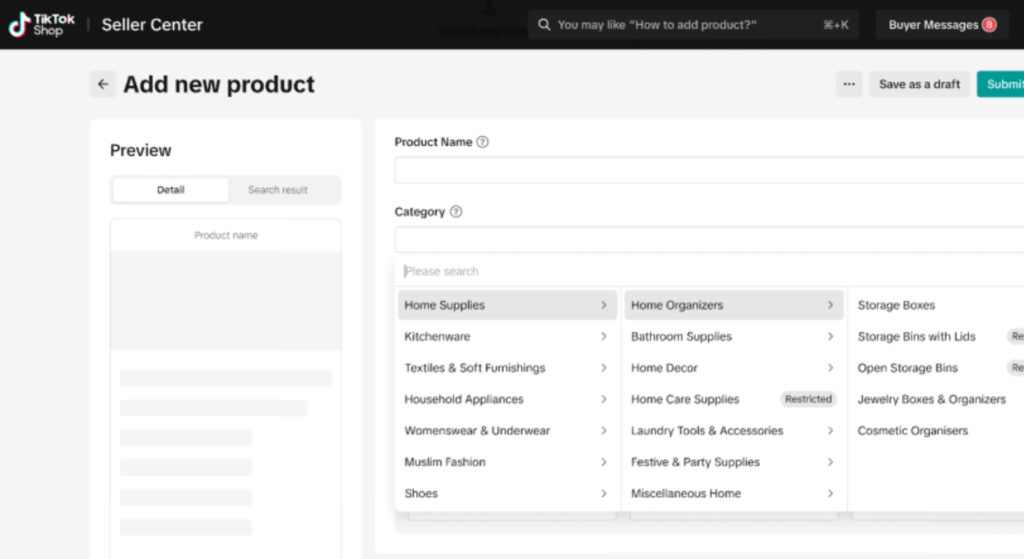
- Select the correct product category using TikTok’s category tree
- Fill in title, description, images, price, and inventory
- Assign or create a Shipping Template under the Logistics section
- Click Submit for Review
Here’s how each step actually looks inside the interface.
Step 1 Navigate to the Product Section
Log in at seller-us.tiktok.com. On the left sidebar, click Products. The dropdown will show Product List, Categories, and a few other options.
Click Product List.
You’ll see your current catalog (empty if this is your first listing). Look to the top right there’s an Add New Product button. That’s your entry point. It’s not labeled List a Product or Upload. It says Add New Product. This trips people up.
Step 2 Select Your Category (Get This Right It’s Hard to Change Later)
TikTok’s category tree has three levels. You pick a top-level category, then a sub-category, then a leaf category.
Why this matters: The category you select determines which attributes appear below (size, color, material, etc.) AND which compliance documents if any TikTok requires. Selecting the wrong category at this stage can send your listing into a manual review queue that takes 3–5 business days.
If you’re unsure which leaf category fits, search your product type in TikTok Shop’s search bar as a shopper first. See what category TikTok assigns to similar products. Match that.
Quick note: TikTok does not let you move a live listing to a different category without taking it down and re-uploading. Choose carefully.
Step 3 Add Your Product Title
Your title can be up to 255 characters, but TikTok’s search algorithm behaves differently from Amazon’s. Front-load your most important keyword the specific thing someone would type to find this product within the first 60 characters.
Don’t just copy your Amazon title. Amazon titles are often keyword-stuffed in ways that read awkwardly on TikTok. TikTok shoppers skew younger and respond to titles that read like a real product name, not a search string.
Step 4 Upload Images and Video (The Step That Slows Everyone Down)
TikTok requires a minimum of 1 image but strongly recommends 3–9. The first image becomes your thumbnail in search results.
Image requirements:
- Format: JPG or PNG
- Minimum size: 800x800px
- Max file size: 5MB per image
- No watermarks, no promotional text overlaid on the main image
You can also add a product video here up to 60 seconds. TikTok’s internal data consistently shows listings with video convert at a higher rate than image-only listings. If you have a product demo clip, add it here even if it’s rough.
Step 5 Set Price, SKUs, and Inventory
If your product has variants (size, color, etc.), set them up under Specifications. TikTok calls these Sales Attributes. You’ll create a variant matrix where each combination gets its own price, SKU, and stock count.
For a product without variants: enter price and quantity directly. Simple.
One thing to know about pricing: TikTok Shop runs frequent platform-wide sales events (like TikTok Shop Birthday Sale, Black Friday campaigns). During these, TikTok may show a crossed-out original price alongside a sale price. This pulls from your listed price so don’t underprice at listing just to look competitive. Price at your actual retail value.
Step 6 Set Up Your Shipping Template
This is where listings die. Most first-time sellers hit the Logistics section, see Shipping Template, realize they haven’t created one, and have to leave the listing flow entirely to set one up.
Do this before you start listing your first product:
Go to Orders → Shipping → Shipping Templates and create at least one template. You’ll set shipping methods (standard, expedited), handling time, and whether you offer free shipping or charge by weight/price.
Once your template exists, come back to the product listing and assign it from the dropdown. Done.
Step 7 Submit for Review
Click Submit for Review at the bottom of the page.
TikTok reviews most listings within 24–48 hours. If your listing passes, it goes live automatically. If it’s rejected, you’ll get a notification with a reason common ones include:
- Main image doesn’t meet guidelines (usually text overlay or watermark)
- Missing compliance document for category
- Title contains prohibited terms (certain health claims, competitor brand names)
Or maybe I should say it this way rejection at this stage isn’t a crisis. It’s a checklist item. Fix the flagged issue, resubmit, and you’re back in queue.
Common Errors and How to Fix Them
This section is what TikTok’s own documentation doesn’t include. These are the errors sellers report most often inside TikTok Shop seller communities.
“Product Under Review” Stuck for More Than 48 Hours
Normal review is 24–48 hours. If you’re past that, check:
- Did you select a category that requires compliance documents you haven’t uploaded?
- Is your main image flagged? (TikTok’s image review is automated even slight watermarks trigger holds)
- Is the product in a restricted category? Some categories (supplements, medical devices, certain electronics) require pre-approval from TikTok’s category team before any listing goes live
If none of those apply, contact TikTok Shop seller support directly through the Seller Center chat. Reference your product ID.
Category Rejected After Submission
This happens when your product doesn’t match the leaf category you selected. TikTok’s human reviewers will kick it back.
Fix: Research competitor listings in your space. See which leaf category they’re approved under. Match that. Don’t try to get creative with categories TikTok rewards accurate categorization with better search placement anyway.
Shipping Template Not Showing in Dropdown
You created a template but it’s not appearing when you try to assign it to a listing. This is usually a browser cache issue. Hard refresh (Ctrl+Shift+R on Windows, Cmd+Shift+R on Mac) and reload the listing page. If the template was created in the last 10 minutes, give it 5 minutes to propagate.
TikTok Shop vs. Other Platforms: What’s Different About Listing Here
Quick Comparison:
TikTok Shop vs. Shopify product listing: TikTok Shop is better suited for sellers who want native video-commerce integration, because product listings connect directly to TikTok content and affiliate creators. Shopify works better when you need full storefront customization and multi-channel inventory control. The key difference is that TikTok Shop listings are discovery-driven shoppers find products through content, not just search.
If you’re already on Shopify, there’s a native TikTok channel integration that syncs your Shopify catalog to TikTok Shop automatically. This eliminates most of the manual steps above but it comes with its own category-mapping quirks that need manual correction post-sync.
AutoDS, a product sourcing and listing automation tool popular with TikTok Shop dropshippers, also offers one-click listing from supplier catalogs. Worth knowing if you’re planning to list at scale rather than one product at a time.
How to Optimize Your Listing After It Goes Live
Getting the listing live is step one. Getting it to actually rank in TikTok Shop search is step two and most guides stop at step one.
I’ve seen conflicting data on exactly how TikTok’s product search algorithm weights its ranking factors; some sellers report that sales velocity is the dominant signal, others find that listing completeness (all fields filled, video included) matters more in the early days. My read is that both are true at different stages: completeness gets you indexed, sales velocity moves you up.
Practical optimization checklist for a live listing:
- Title includes the primary keyword in the first 60 characters
- All 9 image slots filled with clean, high-resolution images
- Product description uses bullet points for key features (TikTok’s mobile UI renders these cleanly)
- At least one product video attached even a 15-second clip improves indexing
- Shipping template set to the fastest handling time you can realistically maintain
- Price is competitive within your leaf category (search your category as a shopper and check the price range that dominates page one)
Look, if you’re listing a product that you’re also planning to promote through TikTok videos or affiliate creators, the listing quality directly affects conversion rate from those videos. A blurry main image or missing size chart kills the sale after the video does all the work.
FAQs
Q: How do I add a product to TikTok Shop Seller Center?
A: Go to seller-us.tiktok.com, click Products → Product List, then click Add New Product in the top right. Complete all required fields including category, images, price, inventory, and shipping template, then submit for review.
Q: How long does TikTok Shop product review take?
A: Most listings are reviewed within 24–48 hours. Listings requiring compliance documents or in restricted categories may take 3–5 business days. If you’re past 48 hours with no update, contact seller support through Seller Center chat.
Q: Why was my TikTok Shop product rejected?
A: Common reasons include a main image with text overlay or watermark, missing compliance documents for your category, prohibited terms in the title, or a category mismatch. Fix the flagged issue and resubmit the rejection reason appears in your notification.
Q: Do I need a shipping template before listing a product on TikTok Shop?
A: Yes. You must create at least one shipping template under Orders → Shipping → Shipping Templates before you can publish any product. You assign the template during the listing creation flow.
Q: Should I connect Shopify to TikTok Shop instead of listing manually?
A: If you have more than 10 products, the Shopify TikTok channel integration saves significant time. For one to five products, manual listing gives you more control over category selection and title optimization specific to TikTok’s search algorithm.
Need help getting your TikTok Shop set up correctly from the start? TikTok Shop Expert works directly with sellers to handle listing setup, optimization, and content strategy so your products go live fast and actually get found.